 ProxyZip
ProxyZip / Features / Mock API server
A mock API server, built into your proxy
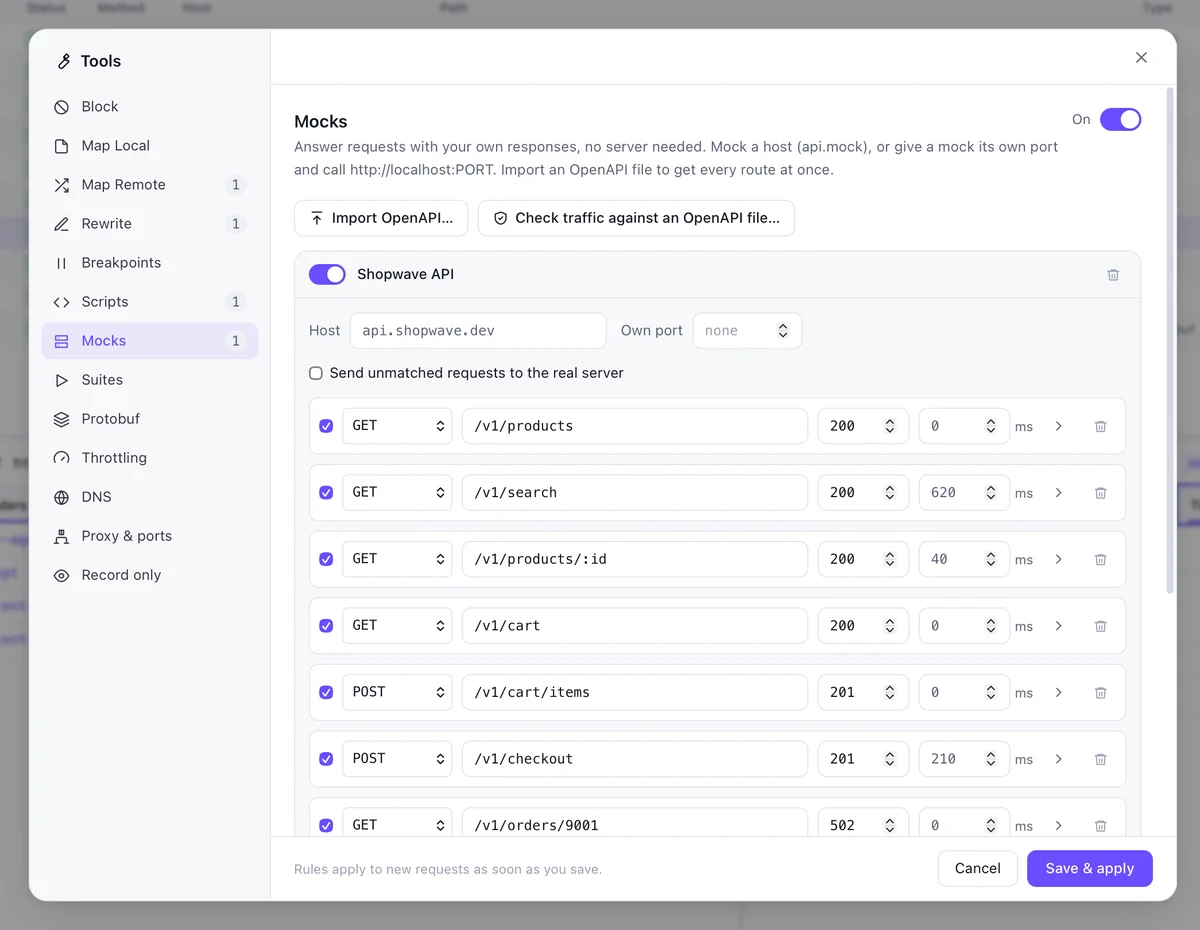
A mock server is a set of routes that ProxyZip answers itself. Use one when the real API is not built yet, is unreliable, or has to fail in a specific way for a test.
Routes
Each route has a method, a path (with :id parameters), a status, headers, a body and an optional delay. Add a route by hand, or right-click a captured response and choose Create a mock from this response.
- Answer as
api.example.dev, or on a port of its own - Return files: JSON, images, and binary bodies such as gRPC frames are served byte for byte
- Add a delay to see how your UI behaves on a slow endpoint
- Return a
502on one route to test your error handling - Unmatched requests can fall through to the real server
Templates
Bodies can use templates to echo the request, generate ids and timestamps or read path parameters, so one route can answer many shapes of request.
OpenAPI
Import an OpenAPI 3 file and ProxyZip creates a route for every operation, with example responses taken from the specification. It can also check captured traffic against the spec and list every request or response that does not conform.
proxyzip mock petstore.yaml --port 4010 --delay 200
proxyzip validate petstore.yaml capture.pzsession
proxyzip validate exits with 1 when something does not match, which makes it usable as a CI step.
Share it
Mocks live in your rules, so they can be saved in a workspace file and committed with the project.
Read the full mocks guide, or turn your mocks into automated tests.