 ProxyZip
ProxyZip / Features / Breakpoints and rewrite
Pause a request, change it, send it on
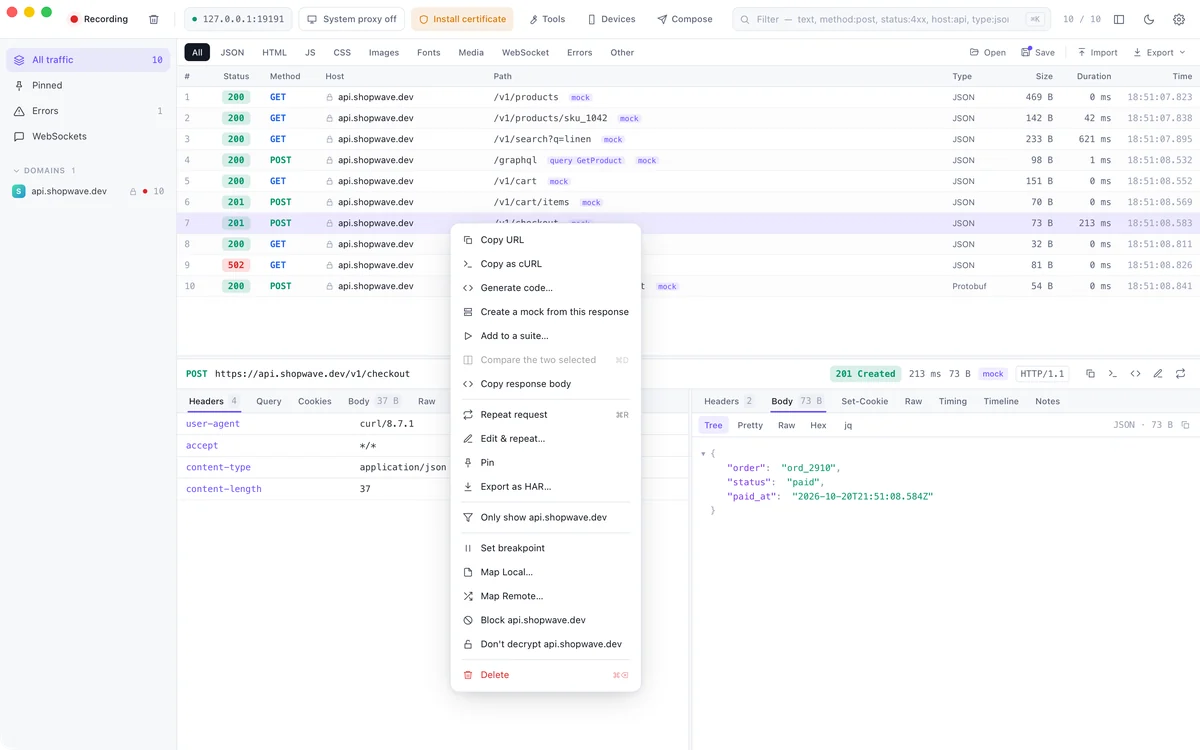
Seeing traffic is half the job. The other half is changing it, so you can reproduce an error or try a fix without touching the server.
Breakpoints
Right-click a request and choose Set breakpoint. The next matching request stops before it leaves, or the response stops before it reaches the app. Edit the method, URL, headers or body, then let it continue or abort it.
Map Local and Map Remote
- Map Local answers a request with a file on your disk, such as a JSON body you are experimenting with
- Map Remote sends the request to another host, for example from production to staging
Rewrite rules
Rewrite headers, bodies and status codes by rule, with matching on the host, path and method. Rules apply to new requests as soon as you save.
Throttle and block
- Throttle to Edge, 3G, 4G or a poor Wi-Fi preset to see loading states
- Block a host to test offline behaviour
- Add DNS overrides, an upstream proxy or record only the hosts you care about
Everything is a rule
Rules live in a JSON file you can load with proxyzip start --rules rules.json and keep in a workspace. The tools guide covers every option.
Next: mock a whole API.