 ProxyZip
Tools
Capturing traffic is only half of debugging. The tools below let you change what happens to it: answer from disk, send requests elsewhere, edit them on the fly, slow them down or pause them mid-flight.
Open them from the toolbar (Tools, ⌘T / Ctrl+T), or right-click a request for shortcuts that create a rule
for it. Edits are applied when you press Save & apply and affect new requests immediately. Every tool has its own
on/off switch, and every rule can be switched off without deleting it.
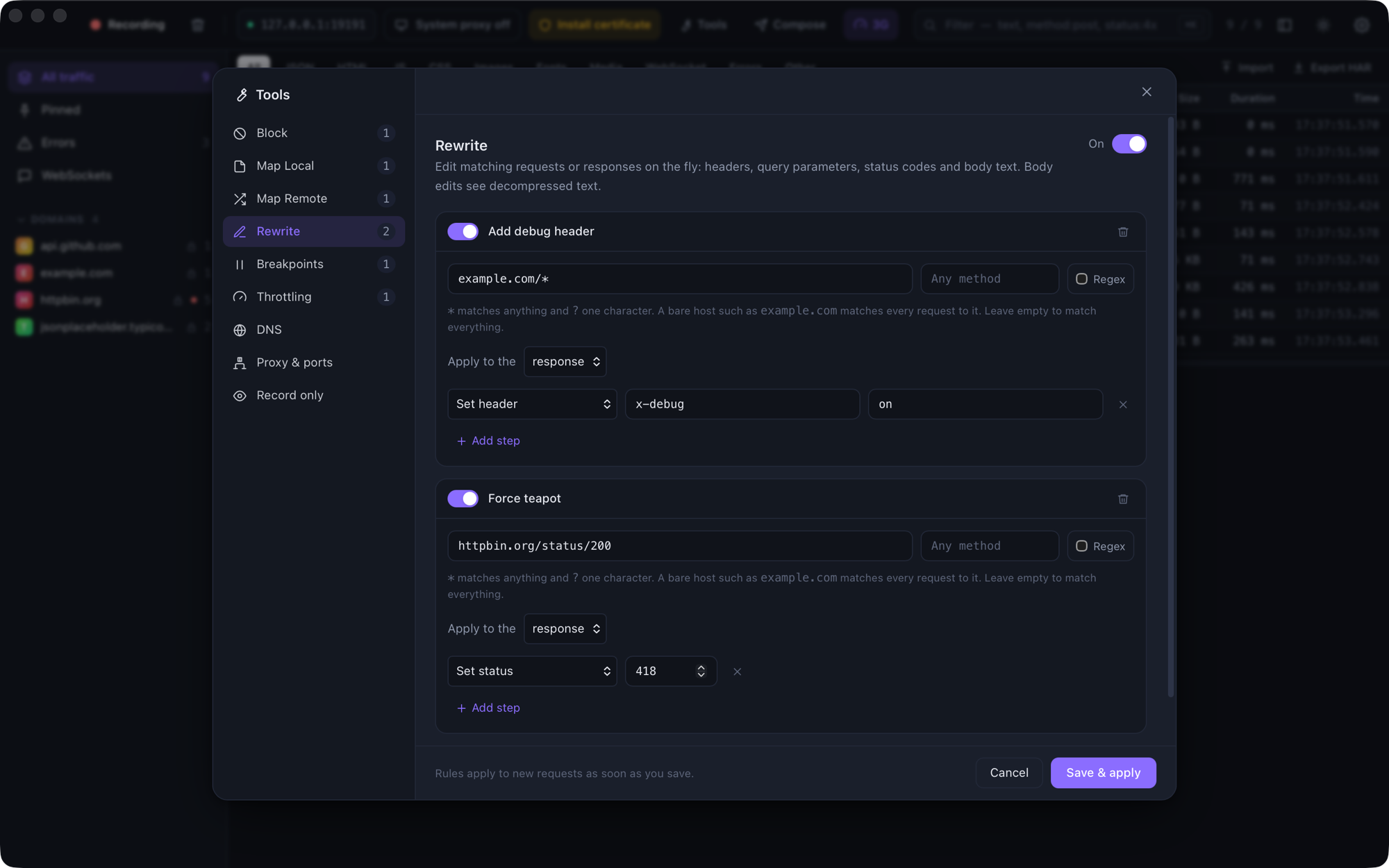
- Matching requests
- Block
- Map Local
- Map Remote
- Rewrite
- Breakpoints
- Compose and Edit & repeat
- Throttling
- DNS overrides
- Upstream proxy
- SOCKS5 listener
- Reverse proxy
- Record only
- PAC file
- Rules file
Matching requests
Every rule starts with a matcher: a URL pattern and an optional list of methods.
| Pattern | Matches |
|---|---|
example.com |
Every request to that host, on any port and path |
example.com:8080 |
Only that port |
api.example.com/v1/* |
Everything under /v1/, scheme ignored |
https://api.example.com/* |
Only HTTPS |
example.com/login |
Exactly /login (a query string is ignored) |
*.example.com/* |
Any subdomain |
Regex option, /users/\d+$ |
A case-insensitive regular expression tested against the full URL |
* matches any run of characters and ? matches exactly one. Methods are a comma-separated list (POST, PUT);
leave it empty for every method. The first matching rule of a tool wins, so put specific rules above general ones.
Block
Stop requests from reaching the internet. Respond with an HTTP status (403 by default), or drop the connection so the client sees a network failure, which is handy for testing error handling.
Quick action: right-click a request → Block <host>.
Map Local
Answer matching requests from your computer instead of the server.
- Always use this file serves one file for everything that matches.
- Look in this folder picks the file from the part of the URL after the fixed part of the pattern. With
example.com/static/*, the request/static/js/app.jsis served from<folder>/js/app.js, and a path ending in/servesindex.html. Paths that try to escape the folder (..) are refused.
You can set the status code, extra headers and the Content-Type (guessed from the file extension by default).
If the file cannot be read, the client gets a 404 that says why, so a typo is easy to spot.
Quick action: right-click a request → Map Local…, then choose a file.
Map Remote
Send matching requests to a different server: production to staging, or an API to localhost:3000. Fill in only what
should change.
| Field | Effect |
|---|---|
| Scheme, Host, Port | Replace that part of the destination |
| Path | Replaces the whole path. The query string is kept |
Keep the original Host header |
Off by default, so the new server sees its own name |
The request in the list shows where it actually went, tagged map-remote.
Quick action: right-click a request → Map Remote….
Rewrite
Edit requests or responses as they pass through. A rule applies to one phase (request or response) and runs its steps in order.
| Step | Phase | What it does |
|---|---|---|
| Set header | both | Replaces the header, or adds it |
| Add header | both | Appends a header, keeping existing ones |
| Remove header | both | Removes every header with that name |
| Set query parameter | request | Replaces or adds a query parameter |
| Remove query parameter | request | Removes a query parameter |
| Set status | response | Changes the status code |
| Replace in body | both | Replaces text (or a regular expression with $1 captures) |
Body edits work on the decompressed text. A gzip, Brotli or Zstandard body is decoded first and the client then receives it uncompressed. Binary bodies are never touched. Header-only rewrites keep streaming; a rule that edits the body has to hold the whole response before sending it.
Breakpoints
Pause matching traffic, edit it, and let it continue.
When a request (or response) matches, it is held and the breakpoint editor opens on its own:
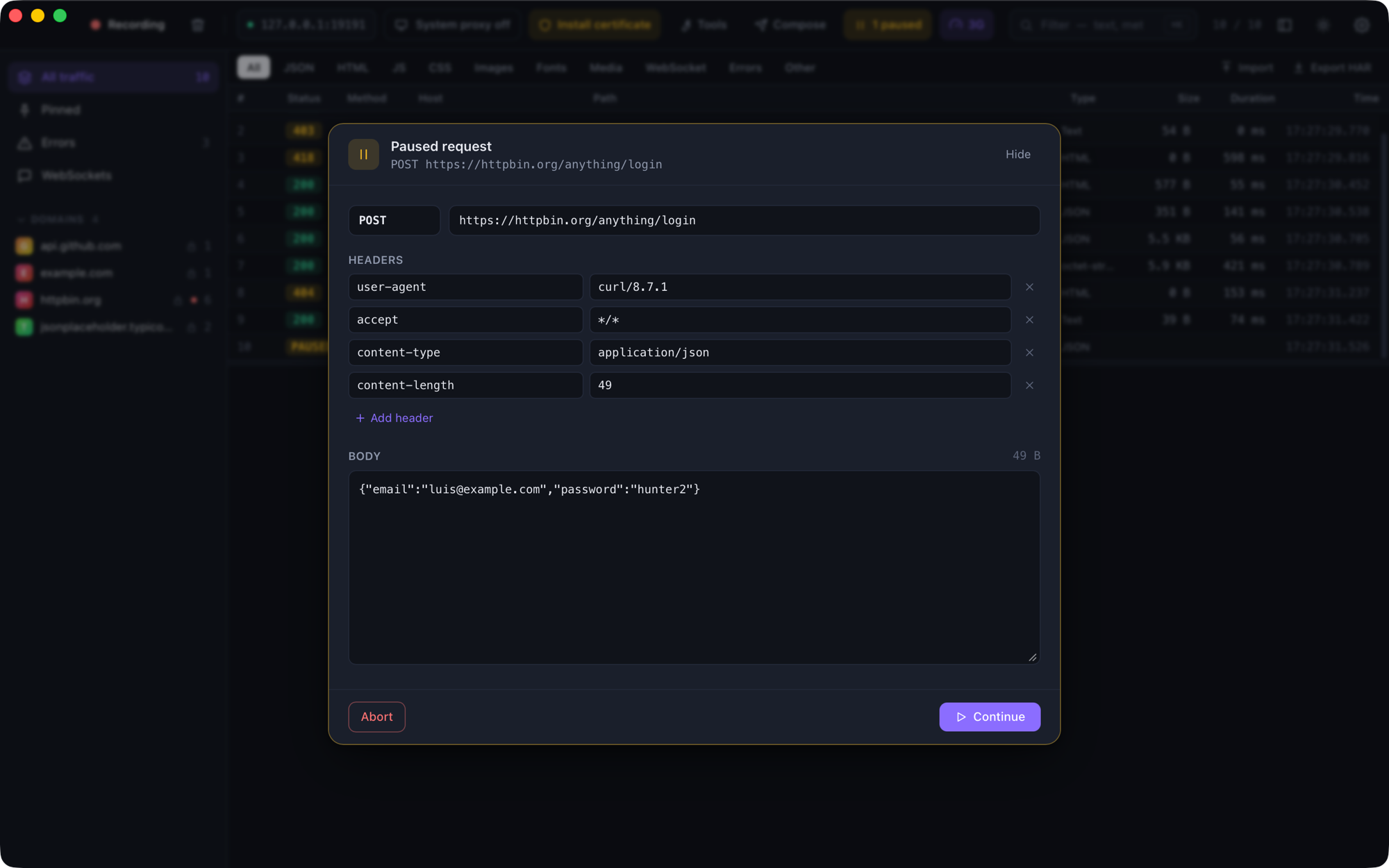
- Request: change the method, URL, headers and body. Changing the URL's host sends the request somewhere else.
- Response: change the status, headers and body. You see the real server response before the client does.
- Continue sends it on (with your edits, if any). Abort closes the client's connection. Continue all releases everything that is waiting. Hide keeps the request paused while you look around; the toolbar shows how many are waiting.
A breakpoint rule can pause the request, the response, or both. Breakpoints only trigger while recording is on, and every paused request is released when the proxy stops.
Quick action: right-click a request → Set breakpoint.
Compose and Edit & repeat
Compose (⌘N / Ctrl+N) builds a request from scratch. Import cURL fills the form from a cURL command, for
example one copied from your browser's dev tools. Edit & repeat… (right-click a request, or the pencil in the
inspector) opens the composer pre-filled with that request.
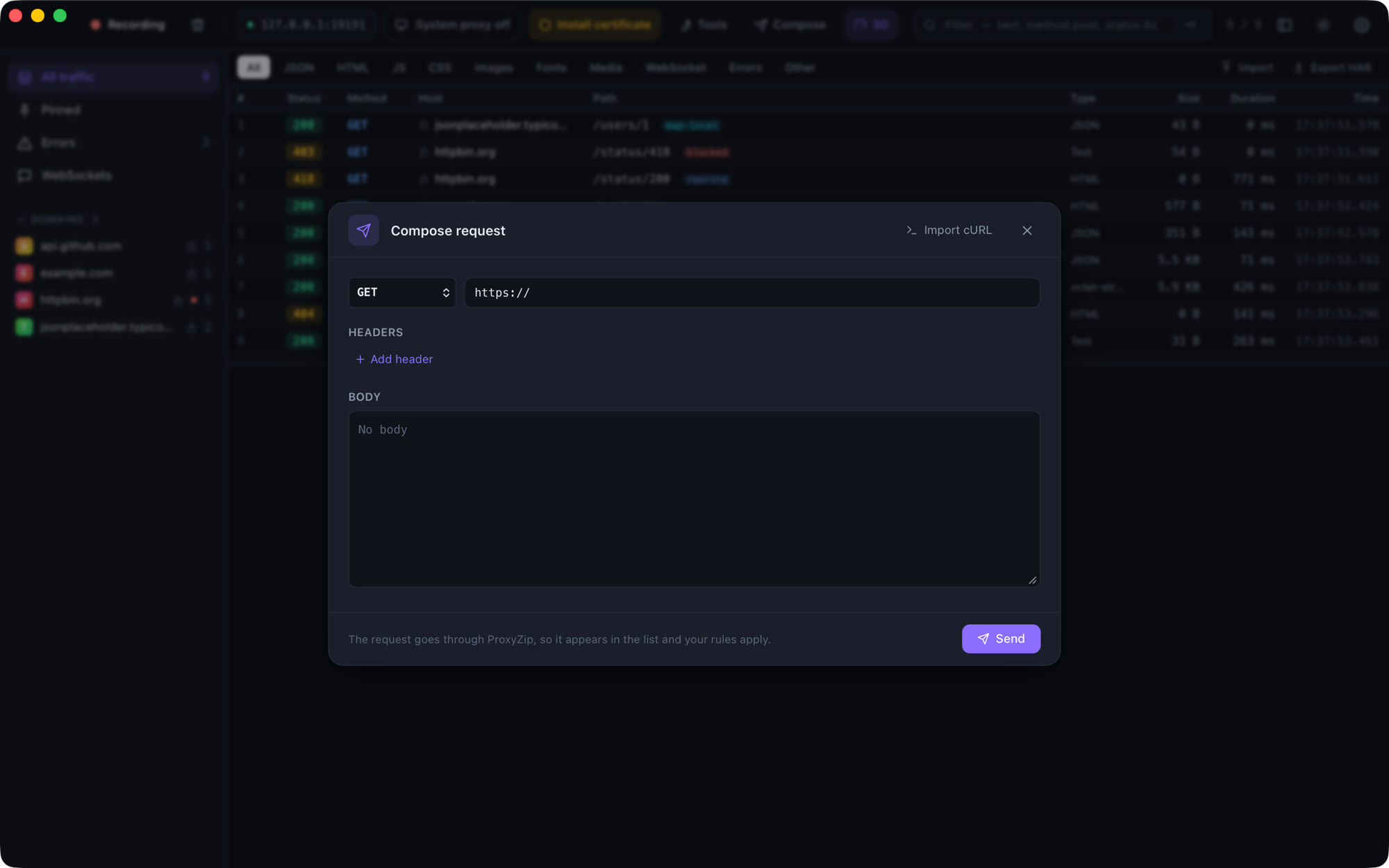
Composed requests go through ProxyZip, so they appear in the list and your rules apply to them.
The cURL importer understands -X, -H, -d / --data-* / --data-urlencode, --json, -u, -A, -e, -b,
-G, -I, --compressed and --url, quoted strings, $'…' strings and line continuations. Options that only
change how curl behaves (-s, -k, -L, -o, …) are ignored.
Throttling
Simulate a bad connection.
| Preset | Latency | Download | Upload |
|---|---|---|---|
| Edge | 400 ms | 240 kbps | 200 kbps |
| 3G | 200 ms | 780 kbps | 330 kbps |
| 4G / LTE | 70 ms | 12 Mbps | 5 Mbps |
| Poor Wi-Fi | 150 ms | 1.5 Mbps | 750 kbps |
Or enter your own numbers (0 means unlimited). Latency is added once before each request is sent, and the
bandwidth limits pace the request body and the response. By default every request is throttled; add filters to limit
it to some hosts. An active profile is shown in the toolbar.
DNS overrides
Resolve a host name to an address you choose, without touching your hosts file: *.example.test → 127.0.0.1.
Overrides apply to everything ProxyZip connects to, including tunnelled (undecrypted) traffic.
Upstream proxy
Chain ProxyZip through another proxy, such as a corporate gateway.
- HTTP proxies must allow
CONNECT. Basic authentication is supported. - SOCKS5 proxies are supported, with optional username and password.
- Bypass lists hosts (wildcards allowed) that connect directly.
The setting applies to new connections. The password is stored in plain text in rules.json.
SOCKS5 listener
Turn this on to accept SOCKS5 clients as well. Their traffic goes through the same pipeline as proxy traffic:
HTTPS is decrypted, rules apply and everything is recorded. The listener supports no authentication and the
CONNECT command. It binds to the same interface as the main proxy, so enable Allow LAN connections in
Settings to reach it from other devices.
Reverse proxy
Expose a server on a local port. With 8081 → https://api.example.com/v1, a request to
http://localhost:8081/users is forwarded to https://api.example.com/v1/users, with the Host header rewritten, and
recorded. It is the easiest way to debug a client that cannot be configured to use a proxy: just change its base URL.
Record only
Keep the list focused. When this is on, only requests that match one of the patterns are recorded; everything else is still proxied normally.
PAC file
ProxyZip serves a proxy auto-config file that sends traffic to it and everything local direct:
http://127.0.0.1:9393/proxy.pac
http://proxyzip.cert/proxy.pac        (from a device that already uses the proxy)
Point a device or browser at one of these as its automatic proxy configuration URL.
Rules file
Rules are stored in rules.json in the ProxyZip data folder (see Certificates),
and the CLI can load the same file with proxyzip start --rules rules.json. Every field is optional.
{
  "block": [
    { "name": "No trackers", "matcher": { "pattern": "*.tracker.example/*" }, "action": { "type": "status", "code": 403 } }
  ],
  "map_local": [
    {
      "name": "Mock the profile",
      "matcher": { "pattern": "api.example.com/v1/me", "methods": ["GET"] },
      "source": { "type": "file", "path": "/Users/me/mocks/me.json" },
      "status": 200
    }
  ],
  "map_remote": [
    { "name": "Use staging", "matcher": { "pattern": "api.example.com/*" }, "host": "staging.example.com" }
  ],
  "rewrite": [
    {
      "name": "Force a feature flag",
      "phase": "response",
      "matcher": { "pattern": "api.example.com/v1/flags" },
      "ops": [ { "type": "replace_body", "find": "\"newCheckout\": false", "replace": "\"newCheckout\": true" } ]
    }
  ],
  "breakpoints": [
    { "name": "Pause logins", "matcher": { "pattern": "api.example.com/login", "methods": ["POST"] }, "on_request": true, "on_response": false }
  ],
  "throttle": { "enabled": true, "profile": { "name": "3G", "latency_ms": 200, "download_kbps": 780, "upload_kbps": 330 } },
  "dns": [ { "host": "*.example.test", "ip": "127.0.0.1" } ],
  "upstream": { "enabled": true, "kind": "socks5", "host": "127.0.0.1", "port": 1080, "bypass": ["localhost"] },
  "reverse": [ { "listen_port": 8081, "target": "https://api.example.com/v1" } ],
  "socks": { "enabled": true, "port": 9394 },
  "record_only": { "enabled": false, "matchers": [] }
}
Each tool also has a switch under "tools" (block, map_local, map_remote, rewrite, breakpoints, dns,
reverse), for example "tools": { "rewrite": false }.