 ProxyZip
ProxyZip / Features / AI assistants (MCP)
Let your AI assistant read the traffic
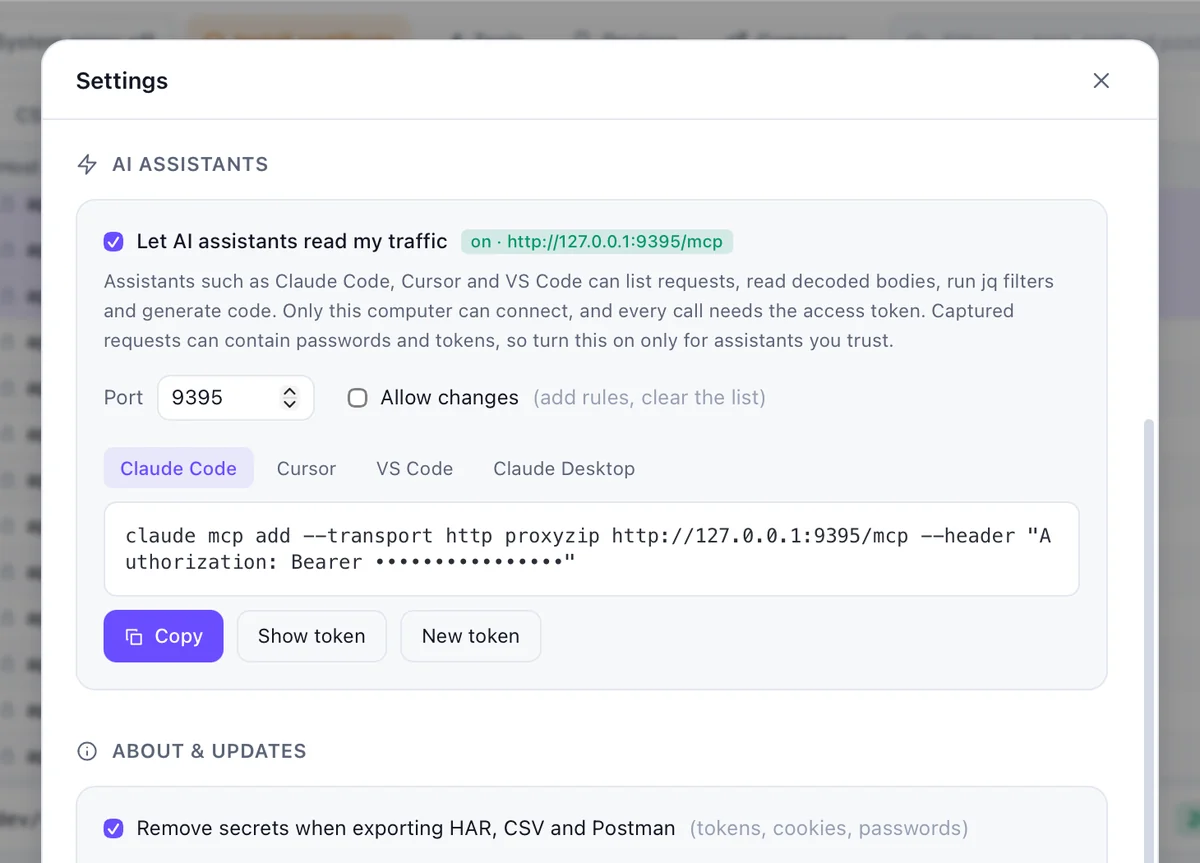
When something fails, you often paste a request into an assistant and ask what is wrong. With ProxyZip's built-in Model Context Protocol server, the assistant can look at the captured traffic itself.
What an assistant can do
- List and filter requests
- Read decoded bodies and run
jqfilters - Generate code for a request
- Export a HAR file
Safe by default
- Off until you enable it in Settings → AI assistants
- Listens on
127.0.0.1only, and every call needs an access token - Secrets such as tokens, cookies and passwords become
<redacted>unless the call explicitly asks otherwise - Read-only: editing rules or clearing traffic needs Allow changes
Set it up
claude mcp add --transport http proxyzip http://127.0.0.1:9395/mcp \
  --header "Authorization: Bearer <token>"
The app shows a ready-to-copy command for Claude Code, Cursor, VS Code and Claude Desktop. From the command line, proxyzip start --mcp 9395 captures and serves MCP together, and proxyzip mcp --session capture.pzsession serves a saved session read-only.
Remember that the assistant's provider receives whatever the assistant reads. Read the MCP guide for the security notes.