 ProxyZip
ProxyZip / Docs / Mock servers and OpenAPI
Mock servers and OpenAPI
A mock server is a set of routes that ProxyZip answers itself. Use it when the real API is not built yet, is unreliable, or you need it to fail in a specific way.
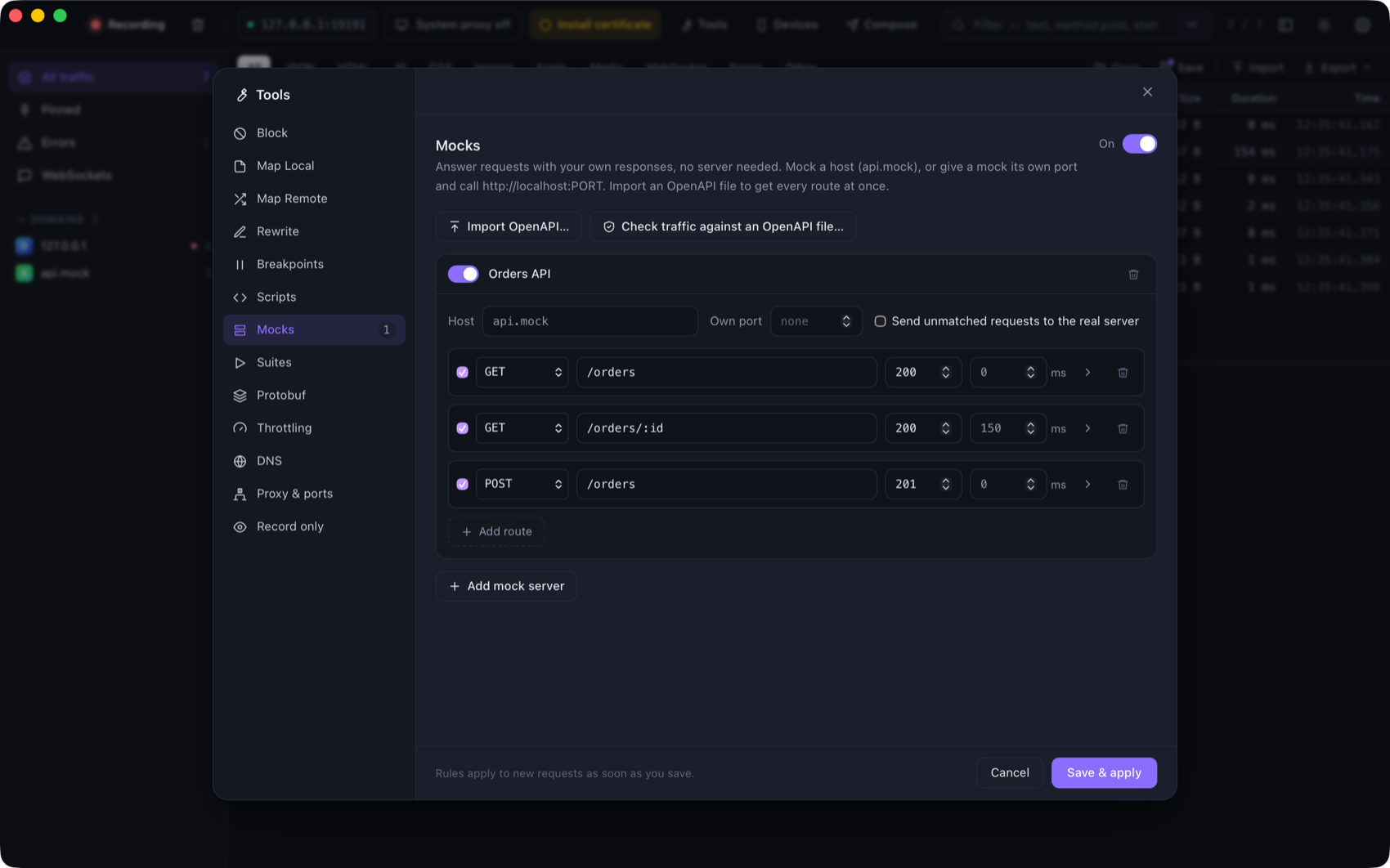
Open Tools → Mocks and add a mock server. There are two ways to reach it:
- By host. Give the mock a host such as
api.mock(wildcards work:*.mock, or a real host such asapi.example.com). Requests that go through ProxyZip to that host are answered by the mock. - On its own port. Set Own port to 4010 and call
http://localhost:4010/orders. No proxy settings are needed, so any app or test can use it. The request still appears in ProxyZip.
Requests answered by a mock are tagged mock. Turning the tool off sends everything to the real servers again.
Routes
| Field | Meaning |
|---|---|
| Method | GET, POST, … or ANY |
| Path | /users/:id captures a segment, * matches one segment, /files/** matches the rest. The query string is ignored |
| Status, delay | What to answer and how long to wait first |
| Body | Text typed in the editor (JSON, XML, anything). The content type is set per route |
The first route that matches wins, so put specific paths before general ones. A request that matches no route gets a
404 that lists the routes, which makes typos easy to spot. Tick Send unmatched requests to the real server to
mock only some endpoints of an API and let the rest through.
Templates
Tick Fill in … on a route and the body (and header values) can use:
| Expression | Value |
|---|---|
{{params.id}} |
A :id segment of the path |
{{query.page}} |
A query parameter |
{{headers.x-token}} |
A request header |
{{body.user.name}}, {{body.items.0.id}} |
A field of the JSON request body |
{{uuid}} |
A random UUID |
{{now}}, {{now_unix}} |
The current time, as RFC 3339 or Unix seconds |
{{random_int 1 100}} |
A random integer |
Anything unknown renders as an empty string, so a template never fails. Write \{{ for a literal {{.
{ "id": "{{uuid}}", "customer": "{{body.customer}}", "page": {{query.page}} }
From a captured response
Right-click a request → Create a mock from this response. ProxyZip adds the route (method, path, status, content type and body) to a server called Captured for that host, with send unmatched requests to the real server on, so the rest of the API keeps working. It is the quickest way to freeze a response and edit it.
OpenAPI
Import
Tools → Mocks → Import OpenAPI… reads an OpenAPI 3.0 or 3.1 file (YAML or JSON) and creates a mock server with one route per operation:
- the status is the first
2xxresponse; - the body is the response's
example, the first of itsexamples, or a value generated from the schema (required and optional properties, enums, formats such asdate-time,uuidandemail, minimums and maximums,allOf,oneOf, cyclic$refs); /pets/{petId}becomes/pets/:petId, and literal paths are tried before parameterised ones;- the mock is bound to the first host in
servers(including its base path such as/v1), so your app talks to the mock simply by being captured by ProxyZip.
Check your traffic against the specification
Tools → Mocks → Check traffic against an OpenAPI file… compares captured requests (the selected ones, or all) with
the specification and lists what does not conform. Click a problem to jump to the request; the requests are tagged
contract-violation.
| Check | Example message |
|---|---|
| The path and method are documented | DELETE is not documented for /pets (documented: GET, POST) |
| Required parameters are present, values have the right type | required header parameter X-Trace is missing |
| A required request body is present and valid | the request body is required but empty |
The status is documented (200, 2XX or default) |
status 500 is not documented (documented: 201, 400) |
| The response body matches its schema | "seven" is not of type "integer" (at /id) |
Requests for other hosts, or outside the API's base path, are skipped. Without servers in the specification, requests
whose path is not in it are skipped too.
Command line
proxyzip mock petstore.yaml --port 4010          # serve a specification as a mock API
proxyzip mock team.pzworkspace                   # serve the mock servers of a workspace
proxyzip validate petstore.yaml capture.pzsession # exits with 1 if anything does not conform
proxyzip validate petstore.yaml capture.har --json
proxyzip mock prints each request it answers. validate is meant for CI: capture traffic from your integration
tests with proxyzip start --save, then fail the build when the API drifts from its specification.
Mocks are stored in rules.json with the other rules, so they are part of a workspace.